

Most grooming salons didn't decide to store cards. It happened gradually. You added card‑on‑file so regulars wouldn't fumble for their wallet at pickup, then no‑show fees needed a card to charge, then a few clients asked you to "just keep it on file" for recurring packages. At some point you went from "we take payments" to "we store payment credentials," and nobody stopped to think about what that actually means for liability.
The moment you keep a card to charge later, you've stepped into PCI territory — whether or not you've ever heard the acronym. The good news is that for a salon using a modern processor, the obligations are far smaller than the panic implies. The bad news is that the gaps that do exist tend to be the exact things salons get wrong: a card number written on an intake form, a shared login, a staff text thread with a photo of someone's Visa.
This is a working checklist, not a lecture. It covers how to scope what you're actually responsible for, what to ask vendors before you trust them, when to tokenize versus store, and — because it will eventually happen to someone — a plain‑English incident response playbook with scripts you can actually send clients.
First, figure out what you're actually on the hook for
PCI scope sounds intimidating because people picture server rooms and audits. For a salon, it really comes down to one question: where does cardholder data touch your business?
There are only a handful of places it realistically can:
-
The physical terminal or card reader at the desk
-
Your booking/POS software's card‑on‑file feature
-
Anywhere a human wrote, typed, photographed, or spoke a full card number
-
The network those devices connect to — your WiFi, basically
What comes up repeatedly across small service businesses is that the software side is usually fine — the processor handles it — and the human side is where scope quietly expands. One front‑desk habit can drag your whole operation into a much bigger compliance picture.
Here's a quick way to self‑assess before you touch anything else.
The scope self‑check
Run through this honestly. Every "yes" is a place cardholder data lives.
| Question | If "yes," what it means |
|---|---|
| Do you store card numbers inside your booking software's card‑on‑file? | In scope — but usually handled by your processor's vault |
| Does any staff member ever write a card number on paper (intake, deposit log)? | High risk — paper is almost always a violation |
| Have clients ever texted or emailed you a card number? | In scope — and that data is now sitting in your inbox |
| Do you use a separate standalone terminal not connected to your POS? | In scope — needs its own attention |
| Is your card reader on the same WiFi as the guest network? | Likely in scope — network separation matters |
| Do multiple staff share one POS login? | Not "data," but it destroys your audit trail |
If every "yes" landed only in the first row, you're in the easiest possible position: you're using a validated processor's card vault and you're not touching raw card data yourself. That's the goal. Most of this article is about getting the rest of your "yes" answers moved into that row or eliminated.
The single biggest scope reducer is simple to say and annoying to enforce: nobody at your salon should ever handle a full card number in a form you control. Not on paper, not in a text, not typed into a notes field. If the card only ever goes into the reader or the hosted payment screen, your scope shrinks dramatically.
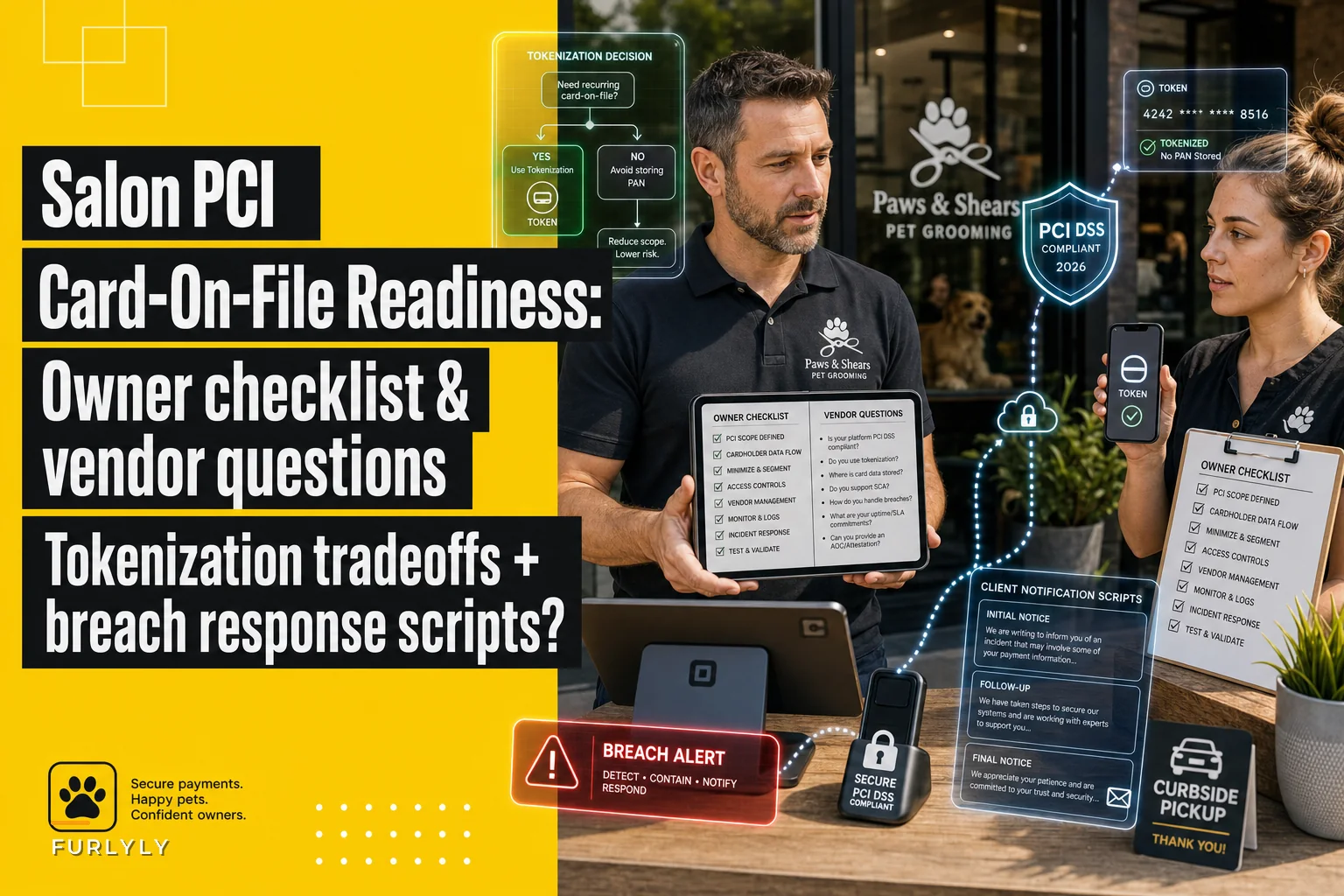
The tokenization decision: store the card, or store a token?
This is the part that actually matters and tends to get skipped. When you "keep a card on file," one of two things is happening behind the scenes, and you need to know which.
Never miss a grooming appointment again.
Furlyly helps you book, confirm, and manage every pet grooming appointment effortlessly.
- Unified appointment scheduling
- Automated client reminders
- Staff availability & shift management
No credit card required
Option A — the processor stores the card and gives you a token. Your software never sees or stores the real number. It holds a meaningless reference that only works to trigger a charge through that one processor. If someone steals your database, they get tokens that are useless anywhere else.
Option B — the card data is being stored somewhere you're responsible for. This is rare with modern salon platforms but still happens with older systems, weird workarounds, or "we save it in a spreadsheet" situations. If this is you, stop and fix it before anything else.
Simple rules for deciding
-
If the vendor offers tokenization, use it. Always. There is no grooming scenario where storing a raw PAN (the full card number) is worth the liability.
-
If a client needs to be charged later — no‑show fees, package auto‑bills, deposits — that's exactly what tokenized card‑on‑file is for. Capture once through the hosted field, store the token, charge against the token.
-
If you only ever charge at time of service, you may not need to store anything at all. Don't opt into card‑on‑file "just in case." Every stored credential is a small ongoing risk.
-
Never build your own storage. A notes field, a Google Sheet, a saved email — all of these turn a non‑event into a reportable breach.
A common example worth mentioning: a two‑van mobile grooming operation wanted to auto‑charge recurring every‑six‑week clients. The owner's first instinct was to keep a card spreadsheet "so we don't lose them." Switching to the processor's tokenized card‑on‑file instead meant the recurring charges still worked fine, but a lost laptop became a non‑issue instead of a nightmare. The functionality was identical. The liability wasn't.
If you want to go deeper on the payment‑handling and reconciliation side specifically, we covered the mechanics in Payments and Tip Policies That Stop Payroll Headaches, and this article picks up where that one leaves off on the security side.
Vendor questions you should ask before you trust anyone with cards
Your compliance largely rides on your processor and POS. The problem is that sales reps are great at saying "we're PCI compliant" and bad at explaining what that covers. "We're compliant" protects them. You need to know what's left on your plate.
Send these questions to any current or prospective payments/booking vendor. Make them answer in writing.
-
Are you PCI DSS Level 1 certified, and will you provide your current Attestation of Compliance (AOC)? A real vendor hands this over without friction.
-
When a card is entered for card‑on‑file, does the raw number ever touch my device, my software, or my database? The answer you want is "no — it's captured in a hosted/iframe field and tokenized."
-
Do you store cards as tokens? Are those tokens usable only through your gateway?
-
If I leave you, can card‑on‑file tokens be migrated, or do clients have to re‑enter cards? This is both a security and a lock‑in question.
-
What exactly is my responsibility under the shared responsibility model? Push until they give specifics, not a brochure.
-
Which SAQ (Self‑Assessment Questionnaire) type do I qualify for using your setup? With a fully hosted/tokenized solution, salons usually land on the shortest one (SAQ A). That's the answer you want.
-
Do you support per‑user logins and activity logs? Shared logins are a quiet killer.
-
How are chargebacks and refunds handled, and who can see partial card details?
If a vendor dodges the AOC request or can't explain where raw card data goes, treat that as your answer. The same scrutiny you'd apply to a supply vendor applies here — the discipline of vetting before you commit is the same muscle we described in Prevent Costly Procurement Mistakes, just pointed at payments.
Where salons actually slip up
The violations that bite grooming salons are almost never sophisticated. They're mundane habits that feel helpful in the moment.
The deposit notebook. A salon takes phone deposits for big dogs or holiday rush and writes the card number on a pad "to run later." That pad is now the single worst thing in your building, compliance‑wise. Full card number, expiry, and name sitting by the phone.
The text‑me‑your‑card habit. A client can't make it in, says "just text me and I'll send my card." Now full card numbers live in a phone's message history and possibly a cloud backup. Nobody ever deletes them.
The shared "front desk" login. Everyone uses the same POS account. When a refund looks wrong or a charge is disputed, you have no idea who did what. This isn't a data‑storage problem, but it wrecks your ability to investigate anything.
The abandoned card‑on‑file. Clients who left two years ago still have tokens or saved cards sitting in the system. Every stored credential you don't need is pure downside. This ties directly to how long you keep any client data — we laid out a purge approach in Client Data Retention and Access Rules for Groomers, and stored payment tokens should follow the same retention schedule as the rest of the client record.
The pattern underneath all of these is the same: staff solving a convenience problem creates a security problem, because nobody told them where the line was. The fix is mostly rules and habits, not technology.
The readiness checklist
Print this. Walk the salon with it. Check each box honestly.
Data handling
-
[ ] No full card numbers are written on paper, anywhere, ever
-
[ ] Staff are trained to refuse texted/emailed card numbers and send a secure payment link instead
-
[ ] All card capture happens through the terminal or the hosted payment screen
-
[ ] Card‑on‑file uses tokens, confirmed in writing by your vendor
Access
-
[ ] Every staff member has their own POS/booking login
-
[ ] Refund and void permissions are limited to specific roles
-
[ ] Logins are removed the day someone leaves
-
[ ] No passwords are on sticky notes or shared in group chats
Systems
-
[ ] Your card reader/terminal firmware is current
-
[ ] Payment devices are not on the open guest WiFi
-
[ ] You have your vendor's current AOC on file
-
[ ] You know which SAQ you qualify for and have completed it
Hygiene
-
[ ] Stored cards/tokens for inactive clients are purged on a schedule
-
[ ] Old intake forms with any payment info have been shredded
-
[ ] Someone owns payment compliance (named person, not "everyone")
When card‑on‑file is worth it, and when it isn't
It makes sense when: you run recurring packages, charge no‑show/late fees, do mobile routes with pre‑authorized clients, or your regulars genuinely value tap‑and‑go pickup. Tokenized storage carries almost no marginal risk in those cases.
It's a bad idea when: you're storing cards "to be nice" with no actual charge‑later use case, or when your system can't tokenize. You're taking on liability for a convenience nobody asked for.
Who should skip it entirely: very small or newer salons with a single location, charge‑at‑service model, and no recurring billing. Don't adopt card‑on‑file until you have a real reason. Fewer stored credentials, fewer problems.
Card‑on‑file is a tool, not a default. Used deliberately with tokenized storage and clear policies, the risk is manageable. Used loosely — because a client asked once and it felt rude to say no — it's a liability that grows quietly until something forces you to deal with it.
The incident‑response playbook (because "probably fine" isn't a plan)
Most salons never decide in advance what happens if card data is exposed. The breach itself is bad; fumbling the response is what turns it into lost clients and legal exposure. You want this written down before you need it.
Here’s a simple flow to follow.
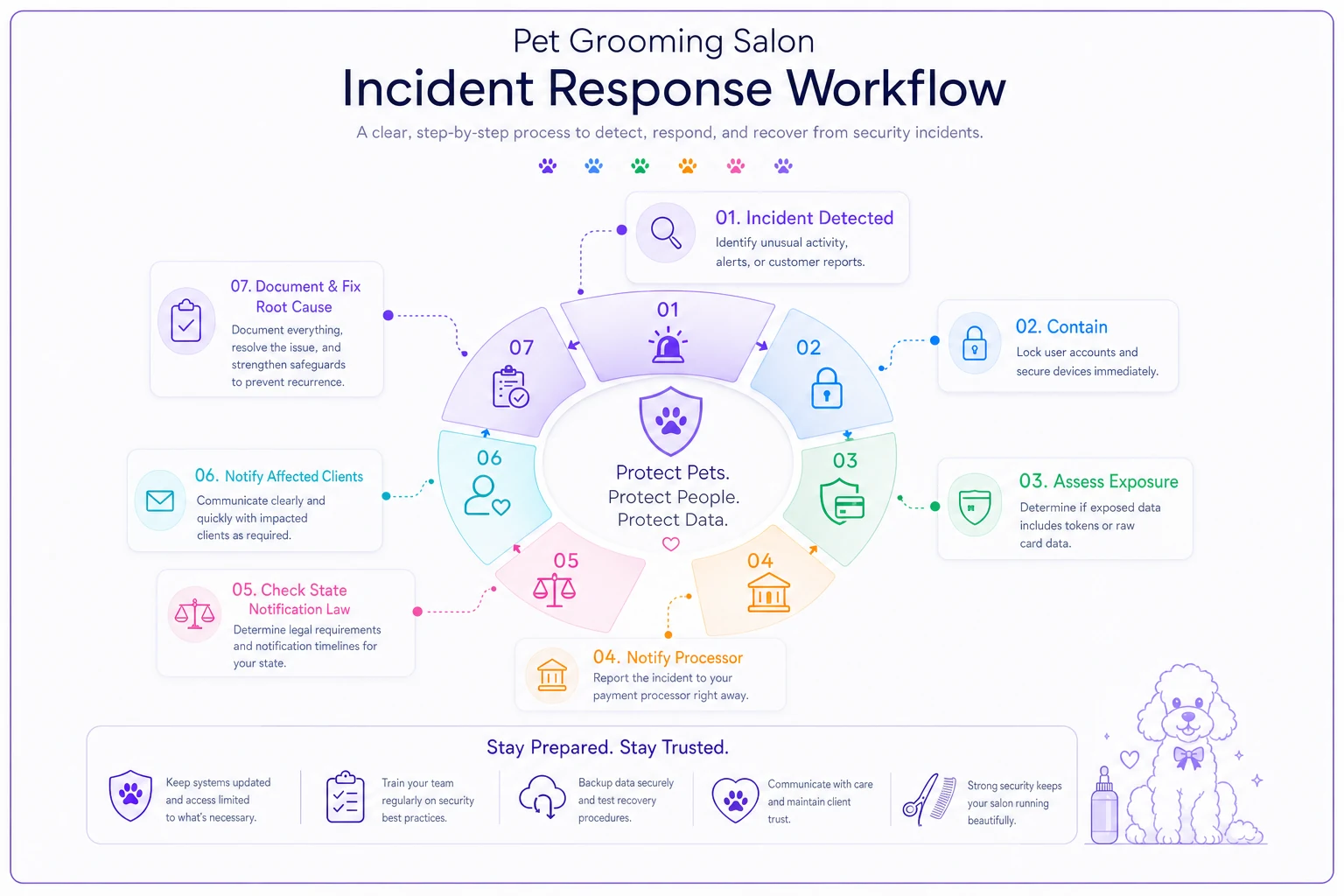
Step 1 — Contain, immediately
-
Stop the bleeding. If it's a lost device, phone, or notebook, lock accounts and change passwords now.
-
If a POS login is compromised, disable it.
-
Do not delete anything yet — you'll need to understand what happened.
Step 2 — Assess what was actually exposed
Was it full card numbers (serious, reportable) or just tokens/last‑four (far less serious)? If everything was tokenized, you may have had a scare rather than a breach. This is the moment you'll be glad you tokenized.
Step 3 — Notify your processor
Your payment vendor has a breach process and legal obligations of their own. Call them early. They'll tell you whether card‑brand notification or a forensic review is required based on what was exposed.
Step 4 — Check your state's notification law
Notification requirements vary by state and by what data was exposed. If actual card numbers were involved, assume you'll need to notify affected clients. Don't guess — this is the one place to call a lawyer.
Step 5 — Notify clients clearly and fast
Vague or delayed notifications destroy trust. Short, honest, and specific is the only approach that works.
Step 6 — Fix the gap and document everything
Write down what happened, what you did, and what changed. If the cause was the deposit notebook, the notebook goes away permanently.
Customer notification scripts
Keep these drafts ready. Adjust to the real facts — never claim "no data was affected" unless you're certain.
If only tokens / last‑four were exposed (low severity):
> "Hi [Name], we're reaching out proactively about a security matter at [Salon]. A recent issue may have exposed limited payment information on file. Importantly, your full card number is not stored in our system — only a secure token that cannot be used elsewhere. No action is needed on your end, but we wanted you to hear it from us directly. Questions? Call us anytime at [number]."
If full card data may have been exposed (serious):
> "Hi [Name], I need to let you know about a security incident at [Salon] that may have involved payment card information you provided us. We've already [contained it / notified our payment processor / removed the affected system]. As a precaution, we recommend you review recent card statements and contact your bank if you see anything unfamiliar. I'm genuinely sorry this happened, and I'm available directly at [number] if you have any questions. We're taking steps to make sure it doesn't happen again."
Follow‑up (after resolution):
> "Hi [Name], a quick update on the security issue we contacted you about. We've completed our review and corrected the cause — [brief, honest description, e.g., 'we eliminated a manual payment process and now use fully encrypted card storage']. Thank you for your patience and for trusting us with [Pet's name]."
The tone across all three: own it, be specific, give them one clear action (or clearly say none is needed), and a real person to call. Clients can usually forgive an honest mistake. What they don't forgive is finding out you knew and said nothing.
A quick real scenario
A single‑location salon with roughly 300–350 active clients ran card‑on‑file through their booking software but had also drifted into taking phone deposits on a paper pad during busy seasons. During a software review, the owner realized the pad held around two dozen full card numbers at any given time — sitting in an unlocked drawer.
Nothing had gone wrong yet. But a single stolen pad or a disgruntled departing employee would have meant notifying every one of those clients and likely eating fines and chargebacks. The fix cost almost nothing: they killed the paper pad, trained staff to send a secure payment link for phone deposits, moved all card‑on‑file to tokenized storage, and gave each front‑desk person their own login. The whole cleanup took about a week of attention, not money.
The outcome wasn't a dramatic revenue jump — it was the absence of a disaster. That's what good PCI hygiene actually buys you: a boring week instead of a terrible month.
The takeaway
Salon PCI compliance for card‑on‑file isn't about becoming a security expert. It's about three habits: never let raw card numbers live in anything you control, confirm your vendor tokenizes and get it in writing, and decide ahead of time how you'd respond if something leaked. Most salons already have the right tools — they just have one or two bad habits quietly undoing them.
Walk the checklist this week. Kill the notebook, close the shared login, pull your vendor's AOC. The difference between a compliant salon and a liability isn't expensive software — it's whether anyone decided to pay attention before something forced them to.
Walk the checklist this week. Kill the notebook, close the shared login, pull your vendor's AOC. The difference between a compliant salon and a liability isn't expensive software — it's whether anyone decided to pay attention before something forced them to.
Ready to streamline your grooming business?
Join 500+ pet groomers using Furlyly to save time, reduce scheduling conflicts, and deliver exceptional client experiences.