

Most grooming salons treat client data like a junk drawer. Everything goes in — phone numbers, card tokens, medical notes, before/after photos, vaccination records, that one client's ex-husband's name because he's the one who drops off the dog — and nothing ever comes out. Then something happens. A former groomer leaves and still has photos on their personal phone. A client asks you to delete their info and you realize you have no idea where all of it lives. A card dispute forces you to pull records and you find three different phone numbers for the same person.
The problem isn't that you're collecting data. You need most of it. The problem is that there's no rule for how long each type of data sticks around, who's allowed to open it, and what happens to a client's file once they stop coming in.
This post is about building those rules — specifically field-level retention, role-based access, consent for photos, and a repeatable 90-day cleanup cycle you can actually run.
Why "keep everything forever" quietly becomes a liability
The instinct is understandable. Storage is cheap, and you never know when you'll need an old note. But grooming client data retention isn't really a storage question — it's a risk question.
Every field you hold onto is something you're responsible for. A phone number is low stakes. A saved card token, a note that says "owner going through divorce, dog is stressed," or a photo of a matted dog that got shaved down to the skin — those carry weight. If any of it leaks, gets misused, or ends up in the wrong hands, "we just kept it because it was easier" is not a great answer.
What shows up repeatedly across salons that hit a data problem is that the trouble almost never comes from the useful data. It comes from the stale data nobody cleaned up. The client who moved away two years ago whose card is still tokenized. The staff phone with 400 dog photos on it. The shared spreadsheet a former receptionist still has access to because nobody changed the password.
Retention rules fix this by deciding, ahead of time, that certain data has an expiration date.
Field-level retention: not all data deserves the same lifespan
The core mistake is treating a client file as one object. It isn't. It's a collection of very different fields with very different risk profiles and very different useful lifespans. A phone number stays useful for years. A one-time behavioral note from a bad day might only matter for the next visit.
Never miss a grooming appointment again.
Furlyly helps you book, confirm, and manage every pet grooming appointment effortlessly.
- Unified appointment scheduling
- Automated client reminders
- Staff availability & shift management
No credit card required
| Data Field | Typical Retention | Why |
|---|---|---|
| Name, phone, email | Active + 24 months after last visit | Needed for rebooking and follow-up; low risk |
| Saved card token | Active only; purge 90 days after last visit | High risk, low reason to keep once inactive |
| Vaccination records | Duration of active relationship + 12 months | Liability + local regulation |
| Medical / behavioral flags | Active + 24 months | Safety-critical; see intake notes below |
| Before/after photos (with consent) | Per consent terms, default 12 months | Consent can be time-bound |
| Before/after photos (no marketing consent) | Delete after 90 days unless tied to an incident | Keep only if operationally needed |
| Incident documentation | 3–7 years depending on severity/insurance | Legal and insurance protection |
| Internal staff notes ("difficult owner") | 12 months, reviewed | Sensitive, easily misused |
A couple of things worth calling out.
Your medical and behavioral flags deserve their own handling because they're safety data, not marketing data. If you built these properly at intake, they should already be structured and easy to find — which is exactly what the field-by-field intake templates are designed for. Retention on these should be generous but reviewed, not permanent-and-forgotten.
Incident records are the exception to everything. If a dog was injured, a groomer was bitten, or there was any kind of dispute — that file doesn't follow the normal purge schedule. It gets pulled out and preserved on the longer timeline your insurer expects. The documentation from your safety and incident SOP should feed directly into this longer-retention bucket.
Some of these timelines may also be shaped by local regulations or your insurer's requirements, so treat this table as a starting point, not a compliance guarantee. Check what applies in your area.
Role-based access: stop giving everyone the keys to everything
A pattern that shows up constantly in small salons: everyone has admin. The owner, the manager, the three groomers, the part-time front desk person — all of them can see every client's full file, export the list, and view saved payment info.
That works fine right up until it doesn't. A groomer quits on bad terms. A front-desk hire turns out to be sketchy. Someone accidentally emails a client export to the wrong address. When everyone can touch everything, you have no way to contain a problem and no way to know who did what.
-
Front desk / reception
view and edit contact info, book and reschedule, view non-sensitive notes. No access to full card numbers, no bulk export.
-
Groomer
view assigned clients' service history, medical/behavioral flags, and grooming notes. No access to payment tokens or the full client database.
-
Manager
everything a groomer and front desk can do, plus incident records and staff notes. Can run exports with a logged reason.
-
Owner / admin
full access, including permission settings and audit logs.
-
Former staff
access revoked the same day they leave. Not "next week when I get around to it."
That last point is where most salons fail. Offboarding someone's data access should be a same-day, non-negotiable step — deactivate the login, remove them from shared drives, and if they used a personal device for client photos, get those deleted before they walk out.
One realistic scenario worth thinking through: a salon had a groomer leave to open her own shop two miles away. She still had login access for six weeks because nobody thought to cut it. She wasn't malicious, but she could have pulled the entire client list at any point. That's not a betrayal-of-trust problem — it's an access-control gap you can close with a checklist.
Photo consent: the field everyone collects and nobody governs
Before/after photos are the most-collected and least-governed piece of data in grooming. Everyone takes them. Almost nobody has clear rules on whether they can post them, for how long, or what happens when a client says take it down.
There are really three separate consents hiding inside "can we take a photo," and lumping them together is the mistake:
-
Consent to take the photo — for internal records, before/after comparison, dispute protection.
-
Consent to use it for marketing — website, social, ads.
-
Consent for how long — indefinitely, or time-bound (e.g., 12 months, then re-ask).
A photo taken to document a matting job for your own protection is a completely different thing from a glamour shot you want on Instagram. Treat them differently. The internal-record photo follows your retention schedule and gets purged. The marketing photo lives only as long as consent allows.
> "I allow [Salon] to photograph my pet for grooming records. □ I also allow these photos to be used in [Salon]'s marketing (social media, website, ads) for up to 12 months. I understand I can withdraw marketing consent anytime by contacting the salon."
Two checkboxes, one time limit, one withdrawal path. That's it.
The operational failure point: a client withdraws consent, but the photo is already on three platforms and two staff phones. If you don't know everywhere a photo went, you can't honor the request. So the rule that makes consent real is: marketing photos live in one central, controlled place, not scattered across personal phones. If a groomer takes it on their phone, it moves to the shared system and gets deleted off the device the same day.
A 90-day purge and archival cycle you can actually run
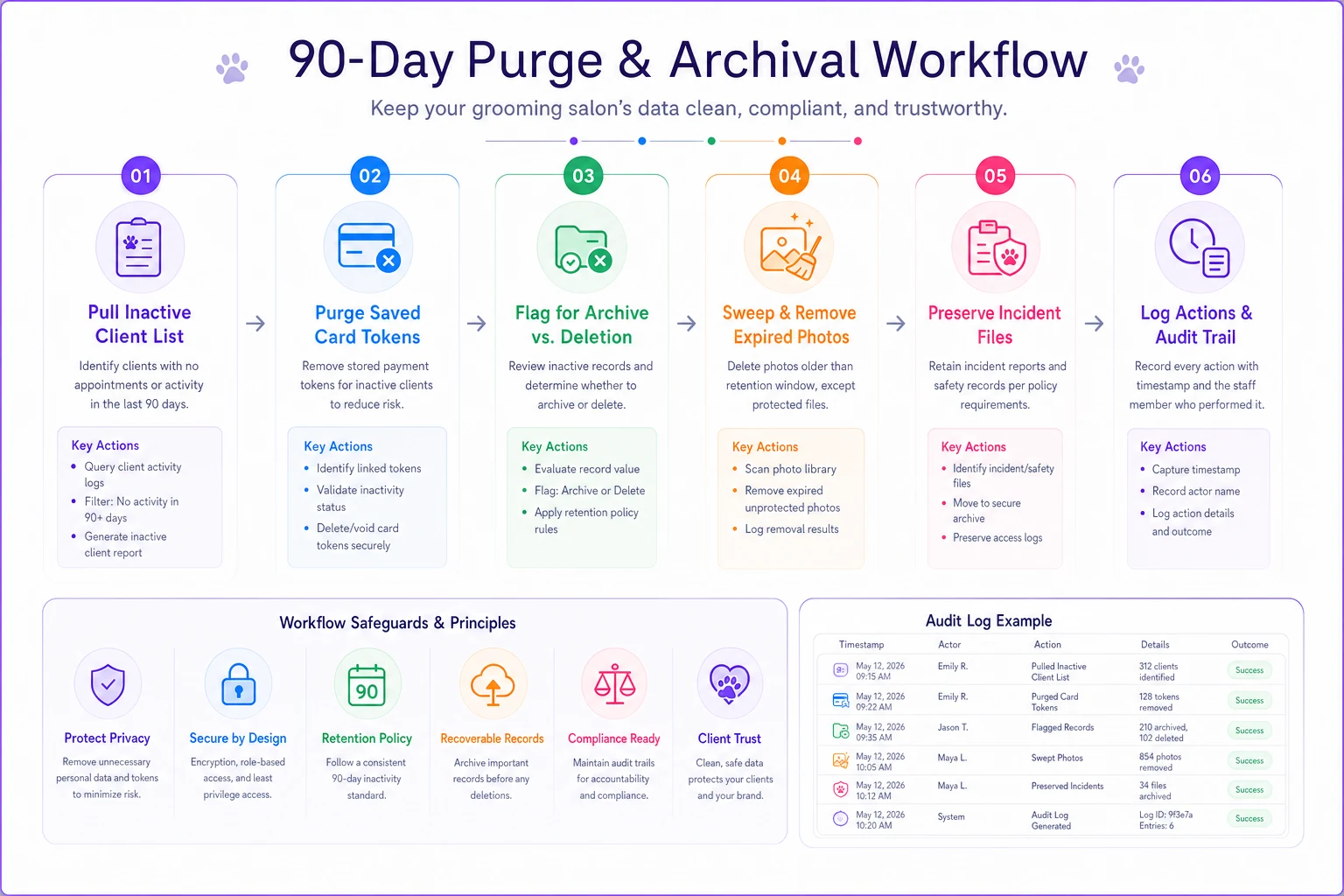
Retention rules are useless if nobody runs the cleanup. The fix is a light quarterly routine — 90 days is frequent enough that data doesn't pile up, infrequent enough that it doesn't become a burden.
-
Pull the inactive list. Identify every client with no visit in the last 24 months (or whatever your threshold is). This is your review pool.
-
Purge card tokens first. Any client with no visit in 90+ days should have no saved payment token. Highest risk, easiest win. Do it first, every cycle.
-
Flag files for archival vs. deletion. Inactive contact info gets archived — moved out of the active database, retained per schedule. Truly expired data gets deleted.
-
Sweep photos. Delete internal-record photos past their retention window. Check marketing photos against consent expiry dates and pull anything past 12 months or with withdrawn consent.
-
Preserve incident files. Before deleting anything, confirm no file in the purge pool is tied to an open dispute, injury, or insurance matter. Those get pulled out and kept.
-
Log it. Note what was purged, when, and by whom. One line in a spreadsheet is enough. If a client ever asks "do you still have my data," you have an answer.
The workflow below visualizes the steps you actually run during each 90-day cycle.
For a salon with a few hundred active clients, the whole cycle takes maybe an hour or two once you've done it once. The first run is the painful one because you're clearing years of buildup.
A realistic before/after
A two-location salon with roughly 900 active client records had never done a purge. Their database held around 2,400 total records — meaning about 1,500 were stale. Nearly 300 inactive clients still had saved card tokens. Photos were spread across four staff phones with no consent tracking at all.
After setting up field-level retention and running the first 90-day cycle: card tokens on inactive accounts dropped to zero, the active database shrank to something that actually loaded quickly and made sense, and all marketing photos moved into one folder with consent dates attached. Nothing dramatic happened to revenue — this isn't a revenue play. But their exposure dropped sharply, offboarding a departing groomer became a five-minute task, and when one client later asked to be deleted, it took a few minutes instead of a scavenger hunt.
Simple incident-response steps when something goes wrong
Even with good rules, something will eventually slip — a lost phone, an accidental export, a data request you can't immediately fulfill. A short response plan keeps you from improvising under pressure.
-
Contain first. Cut the access point immediately — deactivate the login, wipe or lock the device, revoke the share link.
-
Scope it. Figure out exactly what was exposed and whose data it was. Your field-level structure makes this faster because you know what lives where.
-
Notify who needs to know. Affected clients if the exposure is meaningful, and check your local requirements and your insurer's expectations.
-
Document it. Write down what happened, when, what data, and what you did. This becomes a long-retention incident record.
-
Close the gap. Fix the specific control that failed so the same thing can't happen twice.
The salons that handle incidents well aren't the ones that never have them. They're the ones who contained it in an hour instead of finding out three weeks later.
Where software makes this less painful
None of this requires special software — you can run it on a spreadsheet and a calendar reminder. But the parts that are genuinely tedious by hand are exactly what a decent salon management platform handles quietly in the background: expiring card tokens automatically after inactivity, restricting access by role, timestamping photo consent, flagging inactive records for quarterly review.
AI-powered operational software can go a step further — automatically surfacing inactive records that meet purge criteria, tracking consent expiry dates without manual checking, and logging access activity so you actually know who touched what and when. If your current system already stores client data, it's worth checking whether it can enforce these rules for you instead of relying on someone remembering to run the sweep. The rules are what matter; having a system that keeps you honest about following them just removes the friction.
When this is worth the effort — and when it isn't
If you're a solo mobile groomer with 60 clients and one phone, you don't need role-based access. You need a decent consent checkbox and a habit of deleting old photos. Keep it proportional.
Where this becomes genuinely important: multiple staff, multiple locations, saved payment info, and any staff turnover. The more people who can touch client data and the more sensitive that data is, the faster a "keep everything, everyone has access" setup turns into real exposure.
The goal isn't to become obsessive about deletion. It's to make three decisions on purpose instead of by accident: how long each field lives, who can open it, and what happens to a file when a client stops coming in. Decide those once, run the 90-day cycle a few times a year, and the junk drawer stops being a liability.
Ready to streamline your grooming business?
Join 500+ pet groomers using Furlyly to save time, reduce scheduling conflicts, and deliver exceptional client experiences.