


Most grooming salons don't run one software system. They run four or five, and none of them talk to each other cleanly. Your booking software knows who came in. Your POS knows what they paid. Your payroll system knows who worked. Your accounting software is supposed to tie it all together — and instead it becomes the place where discrepancies go to hide.
The frustrating part is that everything feels fine day to day. The register balances, appointments happen, staff get paid. It's only at month-end, or worse, at tax time, that you realize your booking system says you did $41k in revenue and your POS says $38k and your accountant is asking which one is real.
This article is about building the connective tissue between those systems — what data lives where, how to move it without paying for expensive enterprise tools, and the rules you need so that when two systems disagree, you already know which one wins.
The core problem: nobody decided which system is the boss
This is what breaks first, and it breaks quietly. Every one of your systems thinks it's the authority on something. The booking platform thinks it owns the appointment. The POS thinks it owns the money. Payroll thinks it owns hours. And because nobody sat down and formally decided who owns what, you end up with overlapping claims on the same data.
A typical example: a client books a full groom for $95 online. At checkout, the groomer adds a nail trim and de-shed, discounts $10 because the dog is a repeat, and the client tips $20. So now:
-
Booking says
1 full groom, $95
-
POS says
$105 in services + $20 tip = $125 collected
-
Payroll needs
the groomer's commission on $105 — not $95, not $125
Three systems, three different numbers, all "correct" from their own point of view. Multiply that across 300+ appointments a month and you understand why reconciliation feels like archaeology.
The fix isn't more software. It's deciding — on paper, before you touch any integration — which system is the data-of-record for each type of information.
Building your salon data-of-record matrix
The data-of-record matrix is just a simple table that answers one question for every piece of data: if two systems disagree, which one is right?
Never miss a grooming appointment again.
Furlyly helps you book, confirm, and manage every pet grooming appointment effortlessly.
- Unified appointment scheduling
- Automated client reminders
- Staff availability & shift management
No credit card required
| Data type | System of record | Why it wins | Feeds into |
|---|---|---|---|
| Appointment / service booked | Booking system | It's where the client and staff actually commit to the service | Payroll (for commission base), forecasting |
| Money actually collected | POS / payments processor | It's the only system that touches real dollars | Accounting (revenue), reconciliation |
| Tips | POS / payments processor | Tips are entered or captured at payment, not booking | Payroll (tip payout), accounting (liability) |
| Hours worked | Time clock / scheduling | Actual clock-in beats scheduled shifts | Payroll |
| Commission base | POS (net service revenue) | Commission pays on what was collected, not booked | Payroll |
| Retail sales | POS | Retail rarely touches the booking system at all | Accounting, inventory |
| Client contact info | Booking system | It's the primary client-facing touchpoint | POS, marketing |
| Refunds / voids | POS | Money movement lives with the money system | Accounting |
The key insight most owners miss: revenue recognition should almost always follow the POS, not the booking system. Bookings represent intent. The POS represents reality. A booked appointment that no-shows, gets discounted, or gets upsold at the chair is worth a different dollar amount than what booking predicted. If your accounting pulls revenue from booking, you're recognizing money you may never have actually collected.
The one exception is deposits and prepaid packages — cash collected before the service happens. There's a timing gap between when money hits the POS and when the service is actually delivered. More on that in the mapping section below.
Why this breaks worse as you grow
At one groomer and a front desk, discrepancies are small and someone eyeballs them away. The owner remembers that Mrs. Chen's poodle got a $10 discount, so the $10 gap in the books makes sense.
Add a second and third groomer, mobile vans, or a second location, and the eyeballing stops working. Now you've got:
-
Multiple people editing appointments after the fact
-
Discounts applied inconsistently at different stations
-
Tips split across groomers and bathers
-
Retail sold by whoever's near the register
-
Someone forgetting to close out a ticket, so the sale sits "open" overnight
The gaps don't grow linearly — they compound. Across busier multi-groomer shops, unreconciled discrepancies can quietly reach somewhere in the $2k–$5k per month range before anyone notices. By then you can't reconstruct where it came from. The trail is cold.
This is also where the labor cost connection gets dangerous. If your commission base is calculated off the wrong number, you're overpaying or underpaying staff every single pay period. Overpay and your margins leak. Underpay and you get quiet resentment and turnover. Getting the data flow right isn't just bookkeeping hygiene — it directly hits payroll accuracy, which is covered in depth in the piece on card-on-file rules, tip splits and monthly reconciliation.
Cheap and no-code middleware options
You don't need an enterprise integration platform to connect a grooming salon's systems. Most salons are moving a few hundred to a few thousand transactions a month — that's a small data volume. The goal is just to get data out of each system on a schedule and into one place where it can be compared.
| Option | Rough cost | Best for | Tradeoff |
|---|---|---|---|
| Native integrations (POS ↔ accounting) | Often included or ~$10–30/mo | Salons whose POS already talks to QuickBooks/Xero | You take whatever mapping the vendor gives you |
| Zapier / Make (Integromat) | ~$20–80/mo | Connecting booking → sheet → accounting with custom logic | Gets fragile with complex multi-step flows |
| CSV export + Google Sheets | Free–cheap | Nightly manual reconciliation, small salons | Requires someone to run it consistently |
| A2A / built-in sync in modern salon platforms | Bundled | Salons on an all-in-one platform | Only works if you're already on that platform |
For most single or dual-location salons, the honest answer is a CSV export into a reconciliation spreadsheet, plus one automation to pull daily totals. Not glamorous, but reliable — and it forces you to actually look at your numbers instead of trusting a black box.
The trap with Zapier-style tools is that people build a beautiful 8-step automation, it works for two months, then the booking platform changes a field name and the whole thing silently fails. Nobody notices for weeks. If you go the automation route, keep the chains short and always dump a copy of the raw data somewhere you can check by hand.
When middleware makes sense — and when it doesn't
It makes sense when: you're doing 400+ transactions a month, you have more than two people entering data, or you're spending more than a couple hours a week on manual reconciliation. At that volume the automation pays for itself in saved time and caught errors.
It's a bad idea when: you're a solo mobile groomer doing 60–80 appointments a month. You'll spend more time maintaining the plumbing than you'd ever spend just reconciling by hand on a Sunday. Complexity you don't need is a liability, not an asset.
Who should not touch this yet: anyone whose underlying data is still messy. If your service menu isn't standardized in your POS, or half your appointments get manually adjusted at the chair, fix the data entry discipline first. Automating a messy process just produces messy data faster.
Mapping pitfalls that quietly corrupt your books
This is where most integrations go sideways. Mapping is how a field in one system translates to a field in another — "full groom" in booking maps to "Grooming Services" in accounting. Sounds simple. It's not, because the categories never line up cleanly.
-
Tips mapped as revenue. Tips are a pass-through liability, not income. If they land in your revenue account, your sales look inflated and you may owe tax on money that belongs to your staff. This one bites people hard at tax time.
-
Gross vs. net confusion. Does your POS export the amount before or after the processing fee? If accounting records gross but your bank deposit is net, you'll be chasing a roughly 2.6% gap on every batch forever.
-
Refunds not flowing through. A refund in the POS that doesn't reduce recognized revenue leaves your books overstated. Refunds must map to the same category as the original sale, as a negative.
-
Discounts recorded as separate expenses. A $10 loyalty discount isn't an expense — it's reduced revenue. Booking it as an expense inflates both your revenue and your costs, which distorts every margin calculation you make.
-
Deposits recognized too early. A prepaid deposit is a liability until the service happens. Recognize it as revenue on the day it's collected and your monthly revenue jumps around for no operational reason.
-
Retail and services in one bucket. These have wildly different margins. Lump them together and you can't tell whether your grooming is profitable or your shampoo shelf is quietly carrying you.
Almost every one of these errors makes your revenue look bigger than it is. That feels fine right up until you're paying commission and tax on phantom income, or making pricing decisions based on inflated margins.
A nightly reconciliation checklist
Reconcile nightly, not monthly. The whole point is catching discrepancies while you can still remember what happened. A three-day-old mystery gap is solvable. A three-week-old one is effectively a write-off.
-
- [ ] Confirm every appointment marked "completed" in booking has a matching closed ticket in POS
-
- [ ] Flag any appointments still showing "open" or "arrived" but never checked out
-
- [ ] Compare POS total collected against the payment processor's daily batch total
-
- [ ] Verify tips collected in POS match the tip line staff expect (spot check 2–3)
-
- [ ] Confirm any refunds or voids from the day are logged with a reason
-
- [ ] Check that retail sales are separated from service sales
-
- [ ] Note any manual price overrides and why (discount, comp, correction)
-
- [ ] Record deposits collected today as liabilities, not revenue
-
- [ ] Log the day's discrepancy total (should be $0; anything over ~$20 gets investigated tomorrow)
The single most valuable line is the first one. An appointment that shows "completed" in booking but has no matching ticket in the POS is almost always a groom that walked out without paying — or a ticket someone forgot to close. That's exactly where revenue leaks, and catching it nightly means the story is still fresh enough to resolve.
A sample nightly reconcile workflow
Here's how the pieces actually move through the process in practice:
-
Day ends, POS is closed out. The front desk runs the end-of-day report and confirms the drawer balances physically (cash) and against the processor batch (card).
-
Two exports get pulled. One from booking (completed appointments with service and staff), one from POS (tickets with line items, tips, discounts, refunds). If you've automated this, both land in the same Google Sheet on separate tabs.
-
The sheet matches on a shared key. The cleanest key is a ticket or appointment ID that exists in both systems. If your systems don't share an ID, match on client name + date + service as a fallback — messier, but workable at small volume.
-
Exceptions surface automatically. A simple formula flags any completed appointment with no POS ticket, any POS amount that differs from booking by more than a set threshold, and any ticket still open.
-
Manager reviews exceptions only. You don't look at 200 clean rows. You look at the 3–5 that flagged. Most resolve in a minute ("oh, that was a comp for the mess-up last week").
-
Clean, categorized totals flow to accounting. Services, retail, tips (as liability), refunds (as negatives), and deposits (as liabilities) each go to their correct account — not one lump sum.
Nightly reconciliation flow visual:
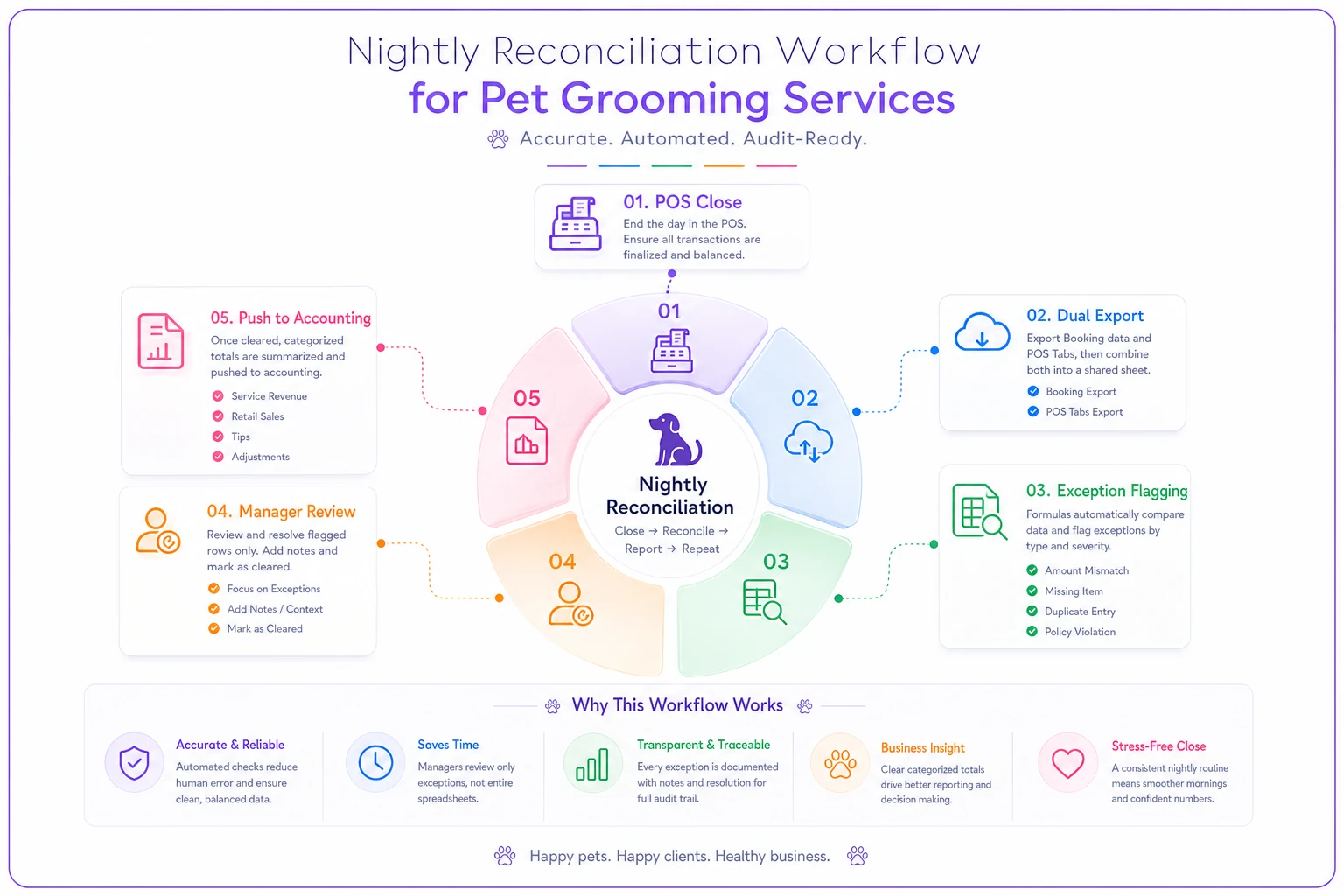
This turns reconciliation from a monthly panic into a boring 10-minute nightly habit. And boring is exactly what you want your accounting to be.
Owner decision rules: when to trust booking vs POS
This trips up every owner eventually, so here's a set of rules you can hand to a manager.
-
For revenue recognition → trust the POS. Always. Money collected is the only real revenue. Booking is a promise; POS is a fact.
-
For commission base → trust the POS net service revenue. Pay commission on what was actually collected for services, after discounts, excluding tips and retail (unless retail commission is tracked separately).
-
For no-show and utilization tracking → trust the booking system. This is the one place booking wins, because it knows what should have happened. The gap between booked and collected is your no-show and cancellation leakage — worth watching closely.
-
For forecasting → trust the booking system, adjusted. Future revenue starts with the booking calendar, then you haircut it by your historical show rate and average discount. Building that link between the calendar and expected cash is exactly the exercise laid out in the lightweight booking-to-revenue forecast spreadsheet.
-
When the two disagree and you can't tell why → the POS wins for the books, and the discrepancy becomes an investigation, not an adjustment. Never just "plug" the difference to make the books balance. That plug is where your real leaks disappear permanently.
The pattern worth internalizing: booking answers "what was supposed to happen," POS answers "what actually happened," and your accounting should only ever recognize what actually happened.
Export mapping templates
From POS → Accounting:
| POS field | Maps to | Notes |
|---|---|---|
| Service line total (net of discount) | Grooming Service Revenue | Split by service type if you want service-level P&L |
| Retail line total | Retail Revenue | Keep separate from services |
| Tips collected | Tips Payable (liability) | Never revenue |
| Processing fees | Merchant Fees (expense) | If POS reports gross |
| Refunds / voids | Same revenue account, negative | Match to original category |
| Sales tax collected | Sales Tax Payable (liability) | |
| Deposits collected | Deferred Revenue (liability) | Recognize when service completes |
From Booking → Payroll / Ops (not accounting):
| Booking field | Maps to | Notes |
|---|---|---|
| Groomer assigned | Commission attribution | Cross-check against POS ticket |
| Service booked | Utilization / capacity tracking | Not for revenue |
| Appointment status | No-show / cancellation reporting | Booking is authority here |
| Scheduled duration | Capacity and labor planning |
Keep the booking export out of your accounting entirely — and hold that line deliberately. The moment booking data starts feeding revenue accounts, someone will accidentally double-count or recognize a no-show as income. Booking informs operations and payroll attribution. POS informs the books. Those are two different jobs.
A real scenario
A two-location grooming salon — roughly 330 appointments a month across both shops, three groomers plus two bathers — was closing its books straight off the booking system's revenue report because it was the easiest number to grab.
The problem showed up when the owner compared reported revenue against actual bank deposits over a quarter. Booking-reported revenue was running about $6k–$7k higher per quarter than money actually hitting the bank. Digging in, the causes were the usual suspects: no-shows still counted as "completed," chair-side discounts never reflected back, and a handful of tickets each week that never got closed out in the POS.
They switched to POS-as-revenue, added a nightly match between completed appointments and closed tickets, and set a rule that any completed-with-no-ticket line got investigated the next morning. Within two months the mystery gap essentially disappeared — remaining discrepancies sat under about $150 a month, all explainable.
More importantly, commission was now calculated off real collected revenue, which corrected a slight chronic overpayment and made pay periods stop feeling like guesswork. Nothing about that fix required expensive software. It required deciding which system was the boss and checking the two against each other every night before the details went cold.
Bringing it together
The reason salon books get messy isn't laziness or bad accounting — it's that four systems each hold a piece of the truth and no one appointed a tiebreaker.
Once you write down your data-of-record matrix, keep booking and POS in their proper lanes, and reconcile the two nightly instead of monthly, the whole thing gets a lot calmer. Start small. Build the matrix. Decide that POS owns revenue and booking owns intent. Run the nightly ten-minute check for two weeks and watch how many small leaks surface that you'd have never caught at month-end. The plumbing between your systems doesn't have to be fancy — it just has to be consistent, and it has to know which pipe to trust when they disagree.
Ready to streamline your grooming business?
Join 500+ pet groomers using Furlyly to save time, reduce scheduling conflicts, and deliver exceptional client experiences.