


Most tech-stack advice for groomers is written like you're running a 12-chair salon with a front desk team and an IT budget. You're not. You're running three tables, you're probably grooming on one of them yourself, and the "IT department" is whoever's phone is closest when the card reader freezes.
So this guide is scoped tightly to that reality: one location, three stylists, and a retail shelf by the register selling shampoo, brushes, and the occasional bag of treats. No multi-unit stuff, no enterprise anything. Just the categories you actually need to evaluate, what each one is really solving, which combinations make sense at your size, and how to switch without torching your calendar.
One hard truth most vendors won't tell you: at three stylists, your biggest risk isn't picking the "wrong" software. It's buying four overlapping tools that half-talk to each other, then paying for all of them while using maybe 40% of each. The goal here is the smallest number of systems that cover everything.
The Software Categories You Actually Need to Evaluate
There are really only five categories that matter at your size. Everything else is either a feature inside one of these or a nice-to-have you can skip for a year.
1. Booking & scheduling. This is the heart of the whole operation. It handles the online booking page, the calendar your groomers work off of, buffers between appointments, and the breed/service time estimates. If this piece is weak, everything downstream gets messy — double-bookings, impossible-to-finish days, groomers sitting idle at 2pm and slammed at 4.
2. Client records & history. Pet profiles, vaccination status, medical flags, grooming notes ("hates the dryer near his back legs"), and photo history. For grooming specifically, this matters more than in hair salons because the dog can't tell you what went wrong last time.
3. Payments & POS. Card processing, tips, card-on-file for no-show protection, and the register side for retail. This is where the money physically moves, so it's also where compliance and reconciliation headaches live.
4. Retail inventory. Even a small shelf needs par levels, reorder tracking, and a way to tie a bottle of shampoo sold to the sale that happened. Skipping this is how shrinkage sneaks in.
5. Communication & reminders. Automated confirmations, reminders, and rebooking nudges over SMS and email. At three stylists, no-shows hurt disproportionately — one empty two-hour slot is a meaningful chunk of your day's revenue.
What most owners miss: categories 1, 2, 3, and 5 are frequently bundled into a single grooming-focused platform. Category 4 (retail) is the one that's often weak or bolted on. So your real decision usually comes down to — does the all-in-one handle retail well enough, or do I need a dedicated POS beside it?
What Each Category Is Really Solving (Beyond the Feature List)
Vendors sell features. You should buy around problems. Here's the mapping.
Never miss a grooming appointment again.
Furlyly helps you book, confirm, and manage every pet grooming appointment effortlessly.
- Unified appointment scheduling
- Automated client reminders
- Staff availability & shift management
No credit card required
| Category | What vendors say it does | What it's actually solving |
|---|---|---|
| Booking/scheduling | "Online booking 24/7" | Preventing days that are physically impossible to finish on time |
| Client records | "Full pet profiles" | Stopping repeat mistakes and liability gaps the dog can't warn you about |
| Payments/POS | "Accept all cards" | No-show losses, tip disputes, and month-end reconciliation that eats your Sunday |
| Retail inventory | "Track your stock" | Quietly leaking margin through shrink and dead SKUs |
| Communication | "Automated reminders" | Protecting the handful of high-value slots you can't afford to lose |
The booking row is the one people underestimate. A grooming calendar isn't like a haircut calendar — a doodle full groom might be 2.5 hours and a nail trim is 15 minutes. If your scheduling tool can't assign realistic time per service per groomer (because your fast groomer and your careful-but-slow groomer aren't interchangeable), you'll keep building days that run 45 minutes over by noon.
A pattern that shows up constantly in small shops: the owner picks software for how the booking page looks, then discovers six weeks later that the retail and reconciliation sides are an afterthought. By then they're locked in and processing 300+ appointments a month through it, so switching feels impossible.
Where AI Automation Quietly Earns Its Keep
Keeping this short because it's not the main point — but it matters for which tools age well.
The modern dog grooming salon software worth looking at uses AI automation in a few genuinely useful, unglamorous places: suggesting realistic appointment durations based on your actual historical times for that breed and groomer, flagging clients drifting toward lapse before they fully disappear, and auto-drafting rebooking messages that you approve rather than write from scratch. The useful version of this isn't flashy — it's the system noticing "this golden took 3 hours the last two visits, not the 2 hours you just booked" and nudging you before you overcommit the day.
What to avoid: platforms selling "AI" as the headline feature while the core booking and reconciliation are weak. The automation should reduce small repetitive decisions, not become the reason you tolerate a clunky calendar.
Concrete Combinations for a 3‑Stylist Shop
You've basically got three workable paths.
Path A: All-in-one grooming platform (handles booking, records, payments, reminders) + accept its native retail
Vendor examples to demo: Gingr, Pawfinity, 123Pet Grooming, MoeGo.
This is the right default for most three-table shops. One login, one source of truth, payments and reminders built in. You accept that retail is "good enough" rather than best-in-class.
When this makes sense: your retail is under roughly 10–15% of revenue, you're selling maybe 20–40 SKUs, and you'd rather have one system than the "best" of each. Which describes most of you.
Path B: All-in-one grooming platform + dedicated retail POS beside it
Vendor examples: the grooming platform above, paired with Square for Retail or Lightspeed for the shelf.
When this makes sense: retail is a real profit center — think a shop pushing shampoo lines, specialty food, and accessories where retail is 20%+ of revenue. The downside is two systems, two reconciliations, and manually keeping the retail numbers flowing into your books.
When this is a bad idea: if retail is small. You'll spend more time reconciling two systems than you'll ever earn from the "better" inventory features.
Path C: General POS (Square) as the hub + a grooming-specific booking layer
When this makes sense: honestly, rarely at your size. It can work if you already run Square and love it, but grooming-specific scheduling and pet records usually end up jammed into fields that weren't built for them. Only go here if a grooming platform genuinely doesn't fit your workflow — which is uncommon.
Who should NOT do this: a new shop with no existing system. Just start with Path A.
My default recommendation
For a single-location, 3‑stylist shop with a modest retail shelf: Path A. Pick one grooming-focused platform that handles booking, records, payments, and reminders natively, and only graduate to Path B if retail becomes a genuine profit center. Don't pre-buy complexity you don't have yet.
The Vendor-Demo Checklist You Can Actually Use on a Call
Demos are designed to show you the happy path. Your job is to drag them off it. Keep this list open during every sales call and make them show you, not tell you.
-
"Book me a 2.5-hour doodle full groom and a 15-minute nail trim back to back. Show the calendar." Watch whether time-per-service is realistic and whether buffers auto-apply.
-
"Show me the same service booked for two different groomers with different speeds." Can durations vary by staff member?
-
"Pull up a repeat client and show me where the medical flag and last groomer's notes appear at check-in." If you have to dig three screens deep, your team won't use it.
-
"Charge a $90 groom, add a $15 tip split between two staff, and sell a $22 bottle of shampoo in the same transaction. Then show me the end-of-day report." This single test exposes most reconciliation weaknesses.
-
"Show me a no-show with a card-on-file charge applied." Is the flow clean or does it require a workaround?
-
"Where do retail par levels live, and what happens when shampoo hits reorder point?" If retail is an afterthought, you'll see it here.
-
"Show me the actual SMS a client receives for a confirmation and a reminder. Can I edit the wording?"
-
"Export all my client data right now, on this call." If they hesitate, that's your answer about how hard leaving will be later.
-
"What's the real monthly cost including payment processing rate, SMS fees, and any per-user charges?" Get the all-in number, not the headline price.
-
"What happens to my card-on-file tokens if I switch processors?" Most can't be transferred — important to know before you're stuck.
Keep this list open during every sales call and make them show you, not tell you.
That data-export question matters more than it seems. The difference between a two-day migration and a two-week nightmare is almost entirely about how cleanly your current system lets you leave.
Hardware and Payments Guidance
Keep hardware minimal and boring. A three-table shop does not need a six-station setup.
-
One main terminal (iPad or a compact all-in-one) at the register
-
One card reader that supports tap, chip, and card-on-file tokenization
-
A receipt printer and a cash drawer (yes, some people still pay cash, especially older clients)
-
A label printer only if you're doing real retail with barcodes — otherwise skip it
-
Optionally, a second tablet in the back for groomers to update notes and snap photos mid-groom
On payments specifically: the processing rate is where money quietly leaks. A difference between, say, 2.6% and 2.9% doesn't sound like much until you run $25k–$30k a month through it — that's a few hundred dollars a year on spread alone. Ask for the effective rate on your average ticket mix, not the advertised card-present rate.
Card-on-file is non-negotiable for no-show protection at your size, but it drags PCI obligations along with it. You want the platform or processor to tokenize cards so the raw numbers never touch your systems. If a vendor stores full card numbers anywhere you can see them, walk away.
Security and Payroll Legal Notes (Read This Before You Sign)
This is the unsexy part people skip and regret.
-
Confirm cards are tokenized, not stored in plaintext. You should never be able to see a full card number.
-
Each staff member needs their own login. Shared logins destroy your audit trail and make tip disputes unresolvable.
-
Role-based permissions
your groomers probably shouldn't be able to issue refunds or export the full client list.
-
Automatic data backups, and a clear answer to "what happens to my data if you go out of business?"
Payroll and tips: this is where software choices collide with law. If your platform splits tips automatically, make sure the split logic matches how you've actually structured pay, and that it produces a clean record for payroll. Tip handling, overtime thresholds, and how commission interacts with minimum wage are all areas where "the software did it" won't protect you in an audit. If you're reworking pay anyway — especially with rising wage floors — it's worth reading the practical pay, pricing and scheduling moves around the July 2026 minimum wage hikes before you lock your software's payroll settings, because the configuration should follow your pay model, not the other way around.
The common mistake: owners let the software's default tip-split logic define their policy, then discover at tax time the records don't reconcile with what people were actually paid. Decide your policy first. Configure the tool to match it.
The Migration Checklist and Timeline
Switching systems is where three-stylist shops lose the most sleep, mostly over unfounded fear. With 300-ish appointments a month and a few hundred client records, this is a weekend-plus-a-week project, not a quarter-long ordeal — if you sequence it right.
-
Two weeks out — export everything from the old system. Clients, pets, appointment history, and upcoming bookings if possible. Get it into a spreadsheet you can actually read. Check for garbage: duplicate clients, pets with no owner, blank phone numbers.
-
Clean the data before it goes anywhere. Migration is your one free chance to kill duplicates and fix bad records. Don't import the mess into a clean system.
-
One week out — import into the new system and spot-check. Pull up 15–20 random clients and verify pets, notes, and flags came across correctly. The vaccination and medical flags specifically — those are the ones that cause real problems if they're lost.
-
Rebuild your services and durations manually. Don't trust an automatic service import. Re-enter your service menu with correct times per service and per groomer. Good moment to fix durations you know are wrong.
-
Set up payments and run a $1 test transaction. Confirm tips, splits, and card-on-file all work before a real client is standing at the counter.
-
Re-enter upcoming appointments. For a three-table shop, manually re-keying the next 2–3 weeks of bookings is often faster and safer than trusting a bulk import to place them on the right calendars. Yes, really.
-
Run both systems in parallel for 3–5 days. Book into the new one, keep the old one readable. This is your safety net.
-
Cut over on your slowest day. A Monday or whatever your quiet day is. Not a Saturday.
-
Kill the old system's online booking page and redirect it so clients can't book into the dead calendar.
Realistic timeline: about two weeks of light prep work, then a focused weekend for the actual switch, then a week running parallel. Total calendar time: roughly three weeks, but your actual hands-on hours are maybe 10–15.
Here's a simple visual of the migration steps to keep on your wall while you work through the weekend.
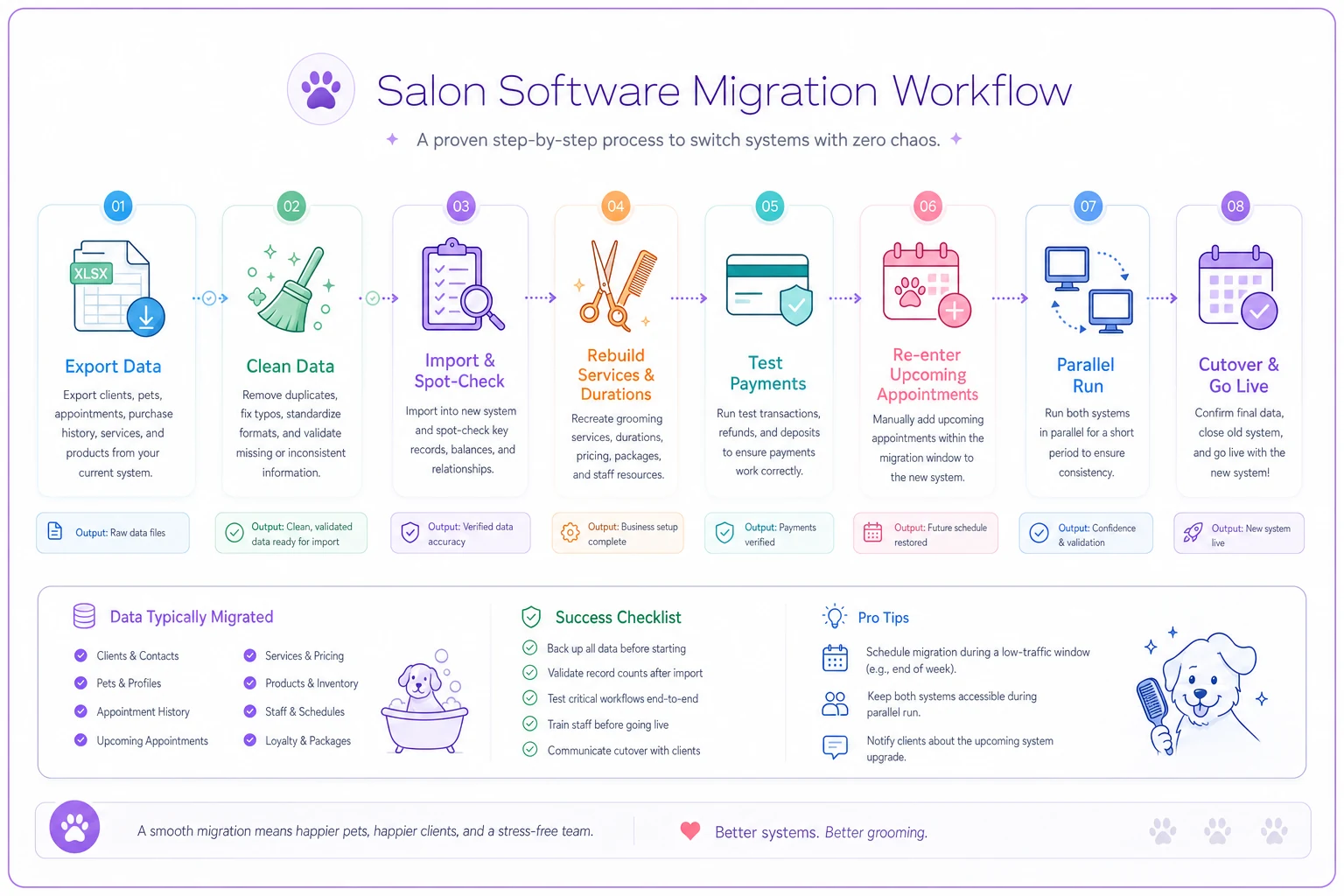
The single biggest migration mistake is cutting over without re-keying or verifying upcoming appointments, then watching two clients show up at the same slot on day two. Protect the next three weeks of bookings above everything else.
A "Test-a-Day" End-to-End Walkthrough
Before you fully commit to a new stack, run one normal day entirely through it while the old system stands by. Here's the full loop to exercise:
> A client books online for a full groom → the confirmation SMS fires → the appointment lands on the correct groomer's calendar with the right duration → at check-in, the pet's medical flag and last-visit notes show up immediately → the groomer updates notes and adds an upsell (say, a de-shed add-on) mid-service → at checkout you ring the groom, the add-on, the tip split, and a bottle of retail shampoo in one transaction → the shampoo decrements inventory → the end-of-day report shows revenue split by service vs retail, tips by staff, and payment totals that match the drawer → a rebooking reminder gets queued for 6 weeks out.
If every link in that chain works smoothly for one real day, you're ready. If any link breaks — the flag didn't show, the retail didn't decrement, the report didn't reconcile — you've found your problem before it's your only system.
This walkthrough does more than any demo, because it's running on your real services, your real clients, and your actual retail mix.
A Real Scenario
A single-location shop with three groomers was running a hair-salon booking app — picked because the booking page looked nice — alongside a separate Square register for retail. Nothing talked to each other. Reconciliation took the owner most of a Sunday evening every week, retail shrink was invisible, and there was no reliable way to charge no-shows because card-on-file lived in a tool the front counter rarely opened.
They consolidated to a single grooming platform (Path A), kept Square only for the retail shelf for a few months, then folded retail in once they confirmed the native inventory could handle their roughly 30 SKUs.
The changes weren't dramatic on paper. Sunday reconciliation dropped from a few hours to about 20 minutes because tips, service revenue, and retail all landed in one report. No-shows fell noticeably once reminders and card-on-file actually got used consistently — they'd been losing somewhere around $400–$600 a month to empty slots and recovered most of it. Because durations were finally set per groomer, the 4pm pileups mostly stopped. No revenue miracle. Just a calmer, tighter operation that stopped leaking in three or four small places at once.
Putting It Together
For a single-location, three-stylist shop with a retail shelf, the whole decision is narrower than the market makes it feel. Start with one grooming-focused platform that natively covers booking, pet records, payments, and reminders. Keep retail native unless it's genuinely a profit center. Run the demo checklist to drag vendors off their happy path, insist on a clean data export before you sign, and migrate by protecting your upcoming bookings above all else.
The owners who get burned aren't the ones who picked the "wrong" platform — they're the ones who stitched together four tools, never fully used any of them, and spent every month-end reconciling systems that were never built to agree. Fewer systems, chosen deliberately, beat more systems chosen enthusiastically. At three tables, simple and reconciled will always outperform clever and fragmented.
Ready to streamline your grooming business?
Join 500+ pet groomers using Furlyly to save time, reduce scheduling conflicts, and deliver exceptional client experiences.